Riyoadvertising Blog Header
business standard

Business Standard Ad Rates 2026 | Book Classified & Display Ads Online

Business Standard Ad Rates 2026 | Book Classified & Display Ads Online

Business Standard Ad Portal

📞 +91 98219 84000

Expert Media Buying Service: 11 Years of Print Advertising Excellence

The Ultimate Guide to Business Standard Classified & Display Ad Online Booking

Placing an advertisement in the newspaper used to require driving to an agent and negotiating column centimeters. I have been doing so for 11 years across Mumbai and Pune. Now, the Business Standard Classified & Display Ad Online Booking portal has altered my work in a real sense: Log in, choose your form, pay, and the ad runs.

However, there are a couple of non-obvious things you should know before using the portal to ensure your campaign achieves the desired impact without unnecessary overhead.

"Choosing the wrong format is a common pitfall. I have seen clients pay ₹8,000 for a display ad for a filing that only required a ₹900 classified notice. Professionalism comes from appropriateness, not just cost."

Classified vs Display — Pick the Right Format

Classified Ads

Text-only adverts charged per word or line. Ideal for property notices, name changes, recruitment, and statutory public announcements.

Display Ads

Feature logos, custom designs, and photos. Charged per column cm. Best for brand campaigns, annual reports, and product launches.

How the Business Standard Classified & Display Ad Online Booking Portal Works

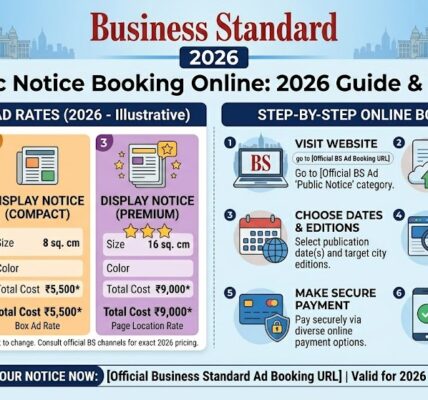
Step 1 — Go to the Booking Portal

Business Standard will run its online booking of ads via a portal. Use the official website. Never use third-party ad agencies that appear in search results until you do some research to confirm them.

Step 2 — Select Your Ad Category

The system organises ads into categories: Public Notice, Recruitment, Property, Business, Personal. Choose the one that suits your purpose. This influences the position of the ad within the paper - wrong category implies wrong placement.

Step 3 — Choose Your Format

Display (visual) or Classified (text). In the case of Display, you will post your creativity. The standard formats are usually JPG or PDF of a given resolution - find the current specifications at the portal; they are being updated.

Step 4 — Select Edition and Dates

For online ad booking Mumbai, select the Mumbai edition. You can also run all-India or multi-edition if needed. The calendar shows available dates. Book at least 2–3 days in advance for classification, 3–5 for display. Time-sensitive bookings sometimes work on shorter notice, but I wouldn't rely on it.

Step 5 — Preview and Confirm

The portal creates a preview in real-time. In the case of classified ads, this displays precise text formatting. To preview, it will demonstrate how your creative will appear on the page. Review it carefully. Mistakes beyond this stage are more difficult to correct.

Step 6 — Pay and Download Confirmation

After making a payment, a booking confirmation is received with an ad ID. Keep that. You'll want it in the event of anything.

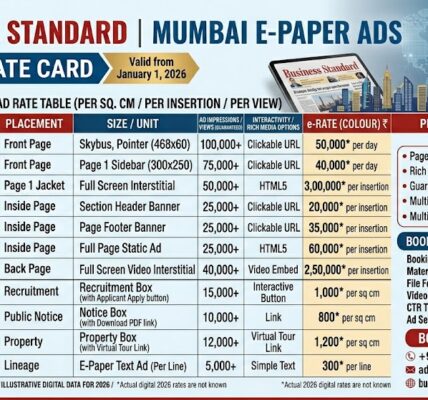
Prices are based on: format (classified vs display), edition (Mumbai, Delhi, national), category and day of the week. Weekend rates are different to weekdays. Prices of e-paper editions can be charged jointly with print or independently.

I cannot provide you with precise up-to-date figures here, Business Standard advertising rates change quarterly. What I quoted a client in January had to be verified again in April. Check on the portal or call the advertising desk before finalising your budget.

Cost Influencers

  • Edition Weight: National runs vs. specific city editions.
  • Timing: Weekday vs. weekend premium rates.
  • Packaging: Bulk bookings cost significantly less per insertion.

Pro Tip: Bundling

If you are running a statutory notice that must be repeated, it is rational to bundle. The savings per insertion are factual compared to single reservations.

Payment and GST Compliance

Multiple Gateways

Accepts credit/debit cards, net banking, and UPI. Net banking is favored for corporate invoice matching.

Instant GST Invoicing

A GST-compliant invoice is created automatically. Download it immediately for your CA/auditors.

Dashboard Tracking

Monitor status from "Confirmed" to "Published." If "Pending" lasts over 24 hours, call the helpline.

After Booking — What Happens Next

Publication Timeline

The classified ad is usually activated within 24-48 hours of booking. Display advertisements can take a little bit more time based on your date of choice and the print cycle.

Print vs E-Paper

When the ad is published, it is normally posted in the Business Standard e-paper too. Print and online tend to be similar - are you particularly interested in the e-paper version (to document, say) in which case, make sure to ask when you book.

Dashboard Tracking

On your dashboard, you are able to monitor ad status. The two statuses you are interested in: Confirmed (booking accepted, to be printed) and Published (ad has run). In case it remains on Pending longer than anticipated, call the advertising helpline. Wait and hope.

Advice for First-Time Bookers

Preview and then pay. Every time. I have made incorrect dates, typo in company name and one time I had selected the Pune edition rather than Mumbai. These are caught in the preview. The only option to fix after payment is available when the deadline of the print cycle is not crossed yet - but this time you have little time than you believe.

Frequently Asked Questions

How do I book a display ad via the Business Standard Classified & Display Ad Online Booking portal?
Log in, and choose your category, pick Display as the format, and upload your creative (JPG or PDF, be sure to check the specs of your resolution). Simply then select the Mumbai edition or any other edition you need, select your date, preview, and pay. The confirmation is via email. Keep the ad ID.
Can I schedule an ad for a future date using online ad booking?
Yes. The calendar will allow you to choose any future date. I tend to reserve a week in advance as often as I can - there is no last minute rush and one gets time to rectify mistakes. In the case of display ads, in particular, prior booking is reasonable.
Are there discounts for multiple bookings?
Yes. Business Standard advertising rates mumbai are lower per insertion, when compared to single-date advertisements. When you are putting the same ad on three or more dates, look at the package prices. The savings are factual. Not applicable when you are making unrelated reservations on alternate dates.
How do I pay?
Credit card, debit card, net banking, UPI. All work. I have not had any problems with UPI payments in the portal. Net banking is generally favored by corporate clients to match invoices.
Can I preview my ad before paying?
Yes — and use it. The system shows a real-time preview of your ad layout. In the case of classified, you can see the formatted text. To display, you get the innovative laying out. Checking takes 30 seconds. Once payment has been made, the error can only be fixed within a limited time.
Can I edit my ad after booking?
No later than the print deadline. After the print cycle has been closed with your selected date, you can no longer make any changes. Practical sense of what is meant by deadline: typically the evening before the publication date, occasionally before that. In case you want to alter anything, call the advertising office at once--do not wait till the portal informs you that it is too late.
Does online ad booking Mumbai include the e-paper?
Generally yes. Print ads are mirrored in the Business Standard e-paper. But in case you require a copy of the e-paper version in particular - say, to file a legal copy - confirm this with the advertising desk before making a reservation. I have observed edge cases when mirroring was put off.
How long does it take for the ad to go live?
Classified: usually 24–48 hours. Display: allow 2–3 days minimum, more if you're booking for a specific edition that has a longer cycle. Don't book for tomorrow if today is already afternoon. That advice has saved a few clients from missing their dates.
Is a GST invoice provided for corporate bookings?
Yes. Get it immediately upon payment. The portal creates a complete tax invoice. It will be required by your finance team. I am always an immediate downloader - I can always find it later in portal history but it takes time.
How do I track my ad status?
Log in to your account, enter your dashboard. Statuses: Pending, Confirmed, Published. Confirmed: It is booked. Published that it was in action. In case Pending is longer than 24 hours, call. Do not think that all is well.

Rates and portal features verified against Business Standard's advertising portal, April 2026. Rates change — confirm before budgeting.

Expert Ad Placement

Business Standard is the go-to for corporate decision-makers. Navigating the Business Standard advertising rates Mumbai and national editions doesn't have to be a manual chore.

If you're unsure about the creative specs or edition choice, reach out. We ensure your ad runs in the right category at the best available rate.

Contact Ad Experts

Sahil Singh is a media buyer with over 11 years of experience in print advertising across Mumbai and Pune, specializing in corporate and financial daily placements.

LEAVE A RESPONSE

Your email address will not be published. Required fields are marked *

Sahil Singh is a professional writer at Riyo Advertising, where he produces clear, reliable content across newspaper advertising, legal notices, marketing, finance, and technology-related topics. His writing focuses on accuracy, clarity, and practical value, helping businesses and individuals understand processes, services, and requirements without confusion. Sahil works closely with industry standards to ensure content is informative, compliant, and easy to read. He contributes regularly to https://riyoadvertising.com/ , supporting clients with well-structured content that serves both informational and business needs.